
Supporting people at home and in retirement communities
Also available directly to individuals and through home care providers

Also available directly to individuals and through home care providers

The MyCareFone SOS Watch uses its own mobile connection, so you can request assistance at home or out and about.
No home alarm or smartphone required.

Your MyCareFone SOS Watch is monitored around the clock by trained operators, backed by two Grade A1 monitoring centres, the highest grading in Australia. Rest assured that when you need help, our friendly team will be there to assist you.
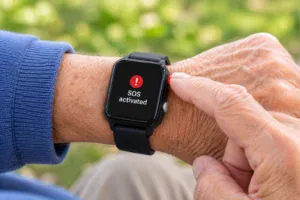
Fall detected or use the SOS button.

Speak through the SOS watch.
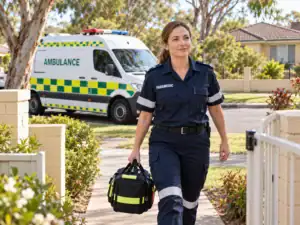
Assistance suited to the situation.
The following plans are available for your MyCareFone SOS Watch service.
Incoming calls on your SOS Watch service are unlimited.
Check coverage where you live and regularly travel before applying.
24x7 monitoring with SOS calls
Pay monthly
Connection: $149
Total minimum cost: $569
Pay annually
No connection charge
Total minimum cost: $499
New to myhomefone? Complete both steps.
1. Create your account 2. Apply for this planExisting customers can go straight to step 2.
24x7 monitoring plus a call allowance
Pay monthly
Connection: $149
Total minimum cost: $653
Pay annually
No connection charge
Total minimum cost: $599
New to myhomefone? Complete both steps.
1. Create your account 2. Apply for this planExisting customers can go straight to step 2.
Unused call time expires each month. Annual plans are paid upfront, plus an initial pro-rata charge for the rest of the activation month. Voicemail, SMS, international calls and roaming are not available. Your watch is supplied with a mobile number. You cannot transfer an existing number to this service or take the supplied number with you when you leave.
See below some of the most frequently asked questions on our MyCareFone SOS Watch service.
The MyCareFone SOS Watch is a Mobile Personal Emergency Response System (mPERS) that connects you to trained monitoring operators, 24 hours a day, seven days a week. You can request assistance at home or out and about, wherever suitable mobile coverage is available.
It has its own mobile connection, so you don’t need a smartphone, internet connection or separate home alarm.
The SOS Watch is available in black only. However, you can personalise its appearance by replacing the standard wristband with a different colour or style.
Compatible replacement wristbands can be purchased separately from a local jeweller or watch repairer, who can help you choose and fit a suitable band.
The watch places a call to our monitoring centre. You can speak with a trained operator through the watch’s built-in speaker and microphone.
The operator will discuss your situation and help arrange appropriate assistance, which may include contacting your nominated emergency contacts or requesting emergency services. Available location information can help, but you should explain where you are whenever possible.
Your service includes rental of the SOS Watch, a magnetic USB charging cable and a power point adaptor.
The watch arrives pre-programmed and ready to use out of the box, with a Quick Start Guide. Charge it and complete the initial test with the monitoring centre before relying on the service.
The watch works within Australia where suitable Telstra IoT mobile coverage is available. You can use it at home, while shopping, on walks or when travelling within Australia.
Coverage and connection quality vary by location. Check coverage using the link on this page for where you live and regularly travel before applying. International roaming is not available.
When enabled, optional fall detection uses sensors to recognise wrist movements that may indicate a fall. If a possible fall is detected, the watch displays a warning and gives you time to cancel if you do not need assistance. If you do not cancel, it places an SOS call to the monitoring centre.
The sensitivity of fall detection can be adjusted by our support team. Contact us if you would like assistance reviewing the setting, including if you are experiencing frequent unwanted alerts.
Every fall is different. Automatic fall detection can help raise the alarm, but some falls may not produce the movement needed to trigger it. Always press the SOS button if you need help and are able to do so.
Charge the watch every night at your bedside and put it back on when you get up. Keep it powered on, including while charging, and within reach in case you need assistance.
Battery life varies with use and mobile reception. Make nightly charging part of your routine rather than waiting for the battery to run low.
Yes, the watch can be worn during normal showering. It is water-resistant, with an IP67 rating, but it should not be treated as waterproof.
Avoid very hot water, steam, direct high-pressure jets and prolonged exposure to soaps or shampoos. Do not wear it while swimming or using a bath, spa or sauna. Dry the watch and charging contacts thoroughly before charging.
If the monitoring centre cannot speak with you through the watch, they will try calling the mobile contact number registered for you.
If they still cannot reach you, they will call your nominated emergency contacts and share any available last known location information from the watch. Your contacts can help establish where you are and advise where assistance should be requested.
If neither you nor your emergency contacts can be reached, the monitoring centre will request an ambulance to your registered service address, usually your home. This may be different from your current location.
The watch’s reported location alone is not enough to direct an ambulance elsewhere. For example, it may identify a shopping centre without identifying the level number or your precise position inside.
Please keep your registered service address, mobile contact number and emergency contact details up to date.
The watch uses several positioning technologies to help the monitoring centre locate you. Location accuracy and availability can vary, particularly indoors or within multi-storey buildings.
Whenever possible, tell the operator your current address or describe nearby landmarks. Location information assists the response process but does not replace confirmation from you or your emergency contacts.
If your SOS Watch cannot connect to its usual mobile network, it may be able to make a backup function emergency call to Triple Zero (000) using another available mobile network. This call goes directly to emergency services, rather than our monitoring centre.
If you speak with the Triple Zero operator, tell them you are calling from a personal alarm watch, explain your emergency and provide your current location. Triple Zero operators do not have direct access to the live location information sent by your watch to our monitoring centre.
We register details of your service in a national telecommunications database that emergency services may access. This information may help Triple Zero contact our monitoring centre for further assistance, but you should not rely on this happening.
If you cannot speak with the Triple Zero operator, emergency services may not know your current location. Any assistance arranged could be directed to your home, even if you are somewhere else.
Backup emergency calling depends on another compatible mobile network being available and cannot be guaranteed.
Yes. All plans include unlimited incoming calls. Outgoing calls to standard Australian numbers are charged according to your chosen plan; the SOS + Standard Calls plan includes a monthly outgoing call allowance.
To make an ordinary call, enter the full phone number on the watch’s dial pad. Saved contacts and speed dial are not currently available. See the plan cards for allowances and rates.
No. Your watch is supplied with its own mobile number. You cannot transfer an existing number to the service or transfer the supplied number to another provider. You cannot retain the number after the service is cancelled.
Yes. Your care provider may be able to arrange an SOS Watch through eligible care funding. They will need to confirm your eligibility, available funding, what is covered and any contribution you need to pay.
If your care provider is already registered with MyHomeFone, they can order an SOS Watch directly from us on your behalf.
If they’re not yet registered, they simply need to contact our Sales Team. We’ll provide an information pack and help them register their organisation. Once registered, they can order SOS Watches for their clients whenever needed.
No. Your monitoring subscription does not include any applicable ambulance or other emergency-service call-out charges.
Charges and entitlements vary depending on where you live or are located and your circumstances. Check with the relevant ambulance service or your insurer to understand your cover.
Your alarm service is supported by two professional monitoring centres, each graded A1.
This grading relates to the monitoring centres’ facilities, systems and operating standards. Two centres provide additional resilience if one location experiences a disruption.

MyCareFone Home Alarm and SOS Watch services are trusted by retirement village operators across Australia, helping thousands of residents live safely.

We partner with home care providers across Australia to deliver reliable personal alarm and monitoring services that support older Australians living independently at home.